
52 lines
2.2 KiB
Markdown
52 lines
2.2 KiB
Markdown
# node-red-contrib-xiaomi-devices
|
|
|
|
This module contains the following nodes to provide easy integration of the Xiaomi devices into node-red.
|
|
|
|
The following devices are currently supported:
|
|
|
|
* Temperature/humidity sensor
|
|
* Aqara temperature/humidity/pressure sensor
|
|
* Magnet switch
|
|
* Aqara window/door sensor
|
|
* Button switch
|
|
* Aqara smart wireless switch
|
|
* Motion sensor
|
|
* Power plug (zigbee)
|
|
* Power plug (wifi)
|
|
|
|
## Preperation
|
|
To receive the gateway json messages on your network you need to enable the developer mode, aka LAN mode in the gateway.
|
|
|
|
A UDP input node is needed to receive the json messages. An UDP output node to send command's to the gateway.
|
|
|
|
To control the Wifi-Plug, extensive use is made of the miio library created by [Andreas Holstenson](https://github.com/aholstenson/miio). Make sure to check his page for compatible devices.
|
|
|
|
## Install
|
|
|
|
```
|
|
cd ~\.node-red
|
|
npm install node-red-contrib-xiaomi-devices
|
|
```
|
|
|
|
## Usage
|
|
|
|
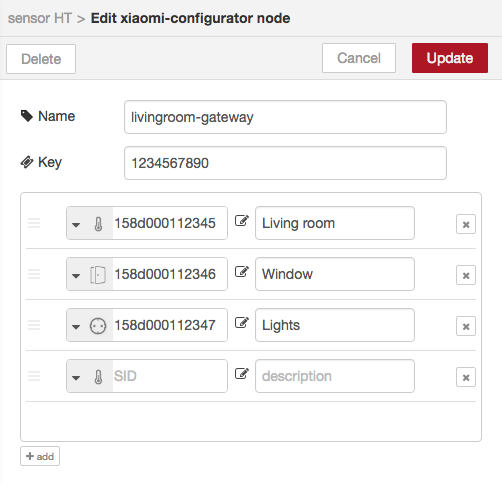
From the Xiaomi configurator screen add your different devices by selecting the type of device and a readable description. The readable discription is used on the different edit screen of the nodes to easily select the device you associate to the node.
|
|
|
|
Note that the Wifi power plug is not configured through the configurator as it is not connected to the gateway.
|
|
|
|
The Xiaomi configurator screen with ease of use to configure your different devices.
|
|
|
|
|
|
|
|
Tip: use the configurator from the side-panel (hamburger menu, configuration nodes) to manage your devices. Node-red doesn't update underlying edit screens if the configuration panel is opened / closed from the edit node screen. (If you do, you need to first close the edit node screen and reopen it by double-clicking the node you want to edit the properties for.)
|
|
|
|
|
|
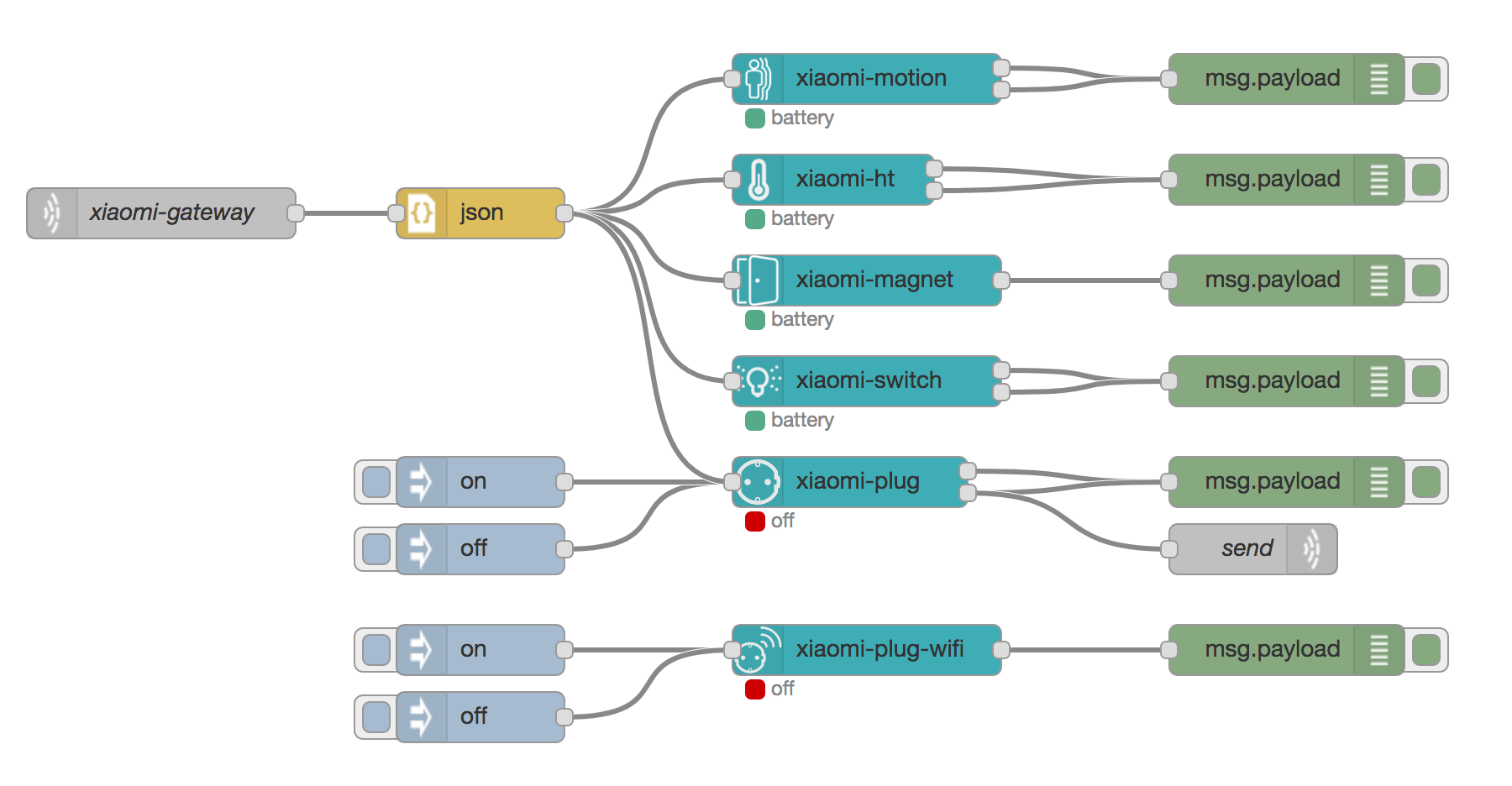
Here an example of how to use the different nodes.
|
|
|
|
|
|
|
|
|
|
## Roadmap
|
|
* ~~Support for other devices like the smart-socket WiFi~~ Done!
|
|
* Import (new) devices directly from the gateway
|